
Embarking on Stop Motion Animation: How to Begin with Minimal Resources

Last edited:

Stop motion animation is an engaging art form accessible to anyone willing to invest time and effort. If you're just starting out, there are several key aspects to consider: equipment, software, educational materials, and courses. Here are the resources to help you get started:
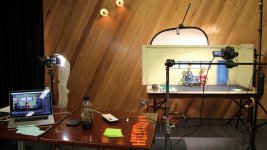
- Camera: Any digital camera with manual shooting mode and a timer will suffice to begin.
- Tripod: Stability is essential for shooting; a simple, inexpensive tripod will do.
- Lighting: Good lighting is crucial for your shooting scene. Initially, you can use regular stationary or desk lamps.
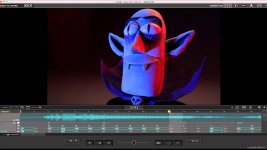
- Stop Motion Studio (iOS/Android): A simple, intuitive app for creating stop motion animation on mobile devices.
- iStopMotion (Mac): A great app for Mac users, offering extensive features and a user-friendly interface.
- Dragonframe: Paid software specifically designed for stop motion animation. It offers advanced features and is used by industry professionals.

- Books:
- "Stop Motion: Craft Skills for Model Animation" by Susannah Shaw
- "The Advanced Art of Stop-Motion Animation" by Ken Priebe
- "Animating Stop Motion: Guide to Making Professional Stop-Motion Animation on a Budget" by Mark Sawicki
- "The Animator's Survival Kit" by Richard Williams - This book covers information on the 12 principles of animation and much more to help you better understand and master the art of animation.
- Online Courses:
- "Stop Motion with Kevin Perry" - This course teaches stop motion animation techniques, shooting methods, and editing from experienced stop motion animator Kevin Perry.
- "12 Principles of Animation by Frank Thomas & Ollie Johnston" - A free online course based on the book "The Illusion of Life," which examines the 12 fundamental principles of animation developed by Walt Disney animators Frank Thomas and Ollie Johnston.
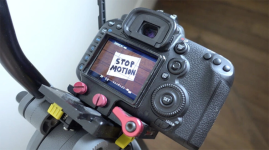
- Manual Shooting: Learn the basics of manual shooting on a digital camera, including adjusting shutter speed, aperture, and ISO. This will give you full control over your shots and ensure high-quality images for your animation.
- Composition: Understanding composition basics and rules will help you create compelling and expressive frames for your stop motion animation.
- Lighting: Study lighting principles and how to use light to create the desired atmosphere and effects in your shooting scene.
Next Steps:
- Practice: Start with simple projects, experiment, and improve your skills.
- Research: Study the works of other stop motion animators and analyze their techniques and style.
- Growth: Gradually expand your equipment and software arsenal as your skills and experience grow.
- Engage in Online Communities: Be active in the stop-motion animator community on stopframe.org. Communicating with experienced peers and receiving advice and support will aid in your development and greatly accelerate it. Here, you can share your work, discuss the latest trends in the world of stop-motion animation, and find inspiration and new ideas for your projects.
Beginners | Animator Talk | Your StopMotion Project | And others.. - Promotion on Social Media: Showcase yourself and your work on social media platforms like Instagram, Reddit, Facebook, YouTube and others. Share your work to receive feedback and advice from professionals and the community.
Warm regard, Magshifter
Last edited:
